
Software tools
A wide range of programming tools are available for M5Stack devices. These include:
The Arduino IDE with ESP32 support, which allows writing and uploading code to M5Stack devices using C/C++.
MicroPython which is an implementation of Python 3 for microcontrollers. It provides an interactive REPL (Read-Eval-Print Loop) for immediate code testing, making it particularly education-friendly. It can be used either directly or as the underlying engine beneath UIFlow.
The ESP-IDF allows developers to flexibly configure and manage MCU resources, making it suitable for projects requiring complex functionality or high performance. It's the lowest-level native framework from Espressif and gives the most control over the hardware.
PlatformIO can be used via the Visual Studio Code extension, providing a full embedded development environment with the M5Unified library, supporting target boards such as the M5Stack Core2 and AtomS3.
StackFlow AI is a concise, efficient, one-stop AI service infrastructure project designed for embedded developers. Based on the M5Stack hardware platform, it enables developers and makers to quickly obtain AI acceleration capabilities on existing embedded devices.
M5Burner is a firmware management platform that integrates firmware burning, exporting, publishing, sharing, and serial monitoring. It provides official regularly updated product demos (factory firmware) and UIFlow firmware that can be easily flashed to devices.
As well as the above, M5Stack also officially supports Home Assistant integration (for smart home automation scenarios) and nanoFramework, which enables C# .NET development on embedded devices. However M5Stack supports UiFlow2 as a more accessible platform for makers with less experience with programming.
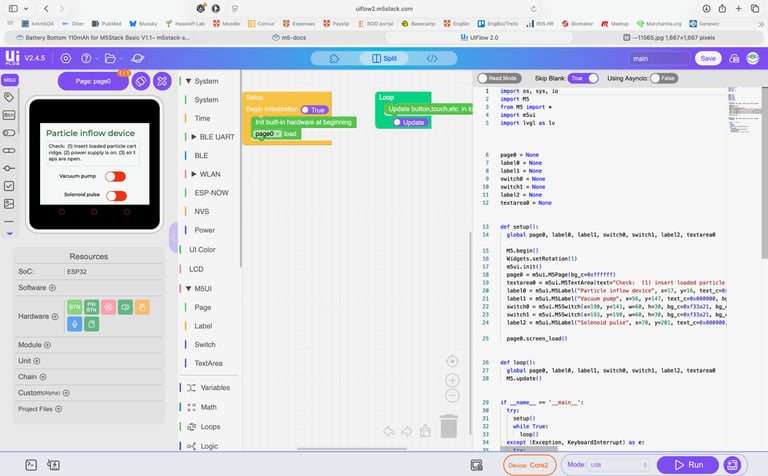
UiFlow2:
2-way Blockly and Micropython visual programming
UIFlow is a visual drag-and-drop programming platform based on MicroPython, enabling fast and intuitive IoT and embedded development. It supports 100+ hardware devices, including ESP32-based controllers, modular components, and various sensors, and is seamlessly compatible with the full M5Stack product ecosystem. It uses a Blockly-style drag-and-drop interface similar to tools like Microsoft MakeCode, and the UIFlow 2.0 web IDE also supports creating LVGL pages, enabling multi-screen GUI design.
Why use UiFlow2 and M5Stack hardware?
In the Biomaker initiative, our aim has been to develop simple and accessible tools that better enable biologists to tackle the assembly of custom instrumentation for their experiments. While some biologists are very familiar with hardware assembly and software programming, many are not. This reflects both the specialist nature of education and research training, lack of 'spare time' to pick up secondary skills, and perhaps also that biologists gravitate towards more visual thinking - while most programming environments are text based. To this end, we continue to explore new hardware and software resources that will help with this. The combination of modular M5Stack hardware and UiFlow2 programming provides automatic integration of important tools into one environment, and greatly simplifies the design and assembly process:
Ease of Use
Block-based visual programming (Blockly) lowers the barrier for beginners and non-programmers
Drag-and-drop interface means you can prototype without memorizing syntax
Switches seamlessly between blocks and MicroPython — you can see the generated code and learn from it
Hardware Integration
Purpose-built for M5Stack modules, so peripherals (displays, sensors, buttons, speaker, IMU) are exposed as first-class blocks — no hunting for drivers!
Plug-and-play support for M5Stack's large ecosystem of "Hat" and "Unit" accessories (ENV sensors, GPS, RFID, LoRa, etc.)
Handles pin mapping and initialization automatically for each specific device variant (Core2, CoreS3, Cardputer, etc.)
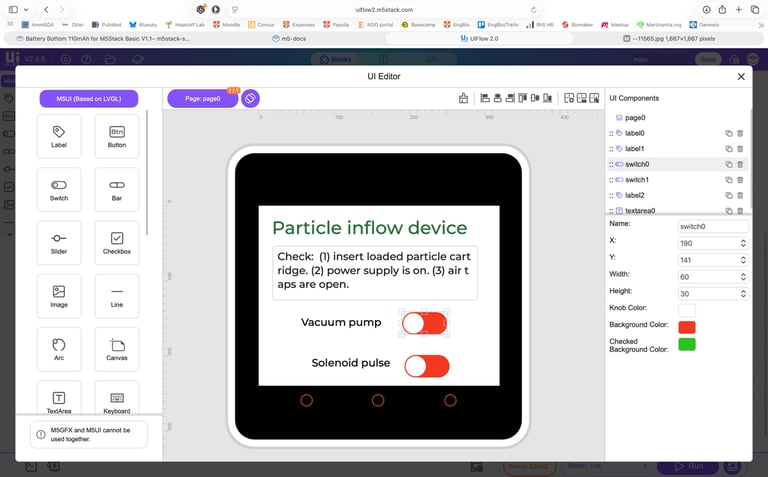
This built-in compatibility extends to programming of device touchscreens, where there is support for interactive, drag-and-drop design of on screen user interfaces and programming with widgets in LVGL
Development Speed
Browser-based IDE — no local toolchain to install or maintain
Live OTA (over-the-air) flash directly from the browser over Wi-Fi for rapid testing
Real-time output and basic debugging in the browser console
Learning Pathway
Blocks → MicroPython transition is smooth; you can eject to pure Python at any time
Good for education: students can start visually and graduate to code as confidence grows
Community & Ecosystem
Large library of example projects and M5Stack community resources
Blocks cover cloud services (MQTT, HTTP, AWS IoT), making IoT projects accessible without deep networking knowledge
Tradeoffs...
Block-based abstractions can be restrictive for advanced use cases
Performance ceiling of MicroPython — compute-heavy tasks still need C/C++ via the Arduino SDK
Browser dependency means offline use is limited
It's best suited for rapid IoT prototyping, education, and projects where the M5Stack peripheral ecosystem is a good fit.
Arguably, this combination of hardware and software currently provides the most integrated package for our Biomaker plans. It caters to beginners wanting to tackle ambitious stand-alone projects - while still allowing custom integration with other platforms through (i) standardised electronic connections (i.e. Grove connectors, I2C standards) (ii) exchange of code through Micropython, (iii) support for Arduino Nesso and Seeedstudio Xiao devices in UiFlow2, and (iv) import of AI-generated code as Micropython.
The future - AI tools and ESP-Claw?
Already, AI-based tools are making an impact on this area - allowing LLM-generated code and code analysis to help with programming efforts. With the current rates of improvement, some programming challenges may soon become routinely machine-driven. One example of this is the recent release of ESP-Claw, which is a prompt-based method for programming ESP32 devices. A set of simple text prompts can guide the remote programming of devices like the M5Stack CoreS3. The resultant code is automatically downloaded through WiFi onto the target device and runs. Some pictures of results below. This appears magic when it works! One can expect this kind of approach to grow in the coming years as performance increases and costs for LLM access reduce. Meanwhile, we think that the UiFlow2-M5Stack provides useful tools and good grounding for building instrumentation.
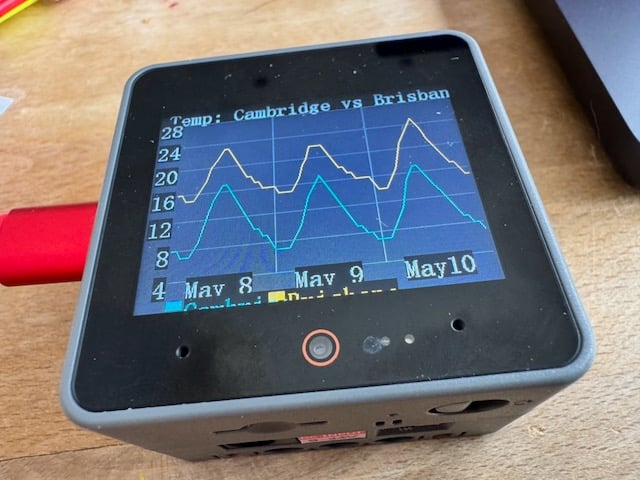
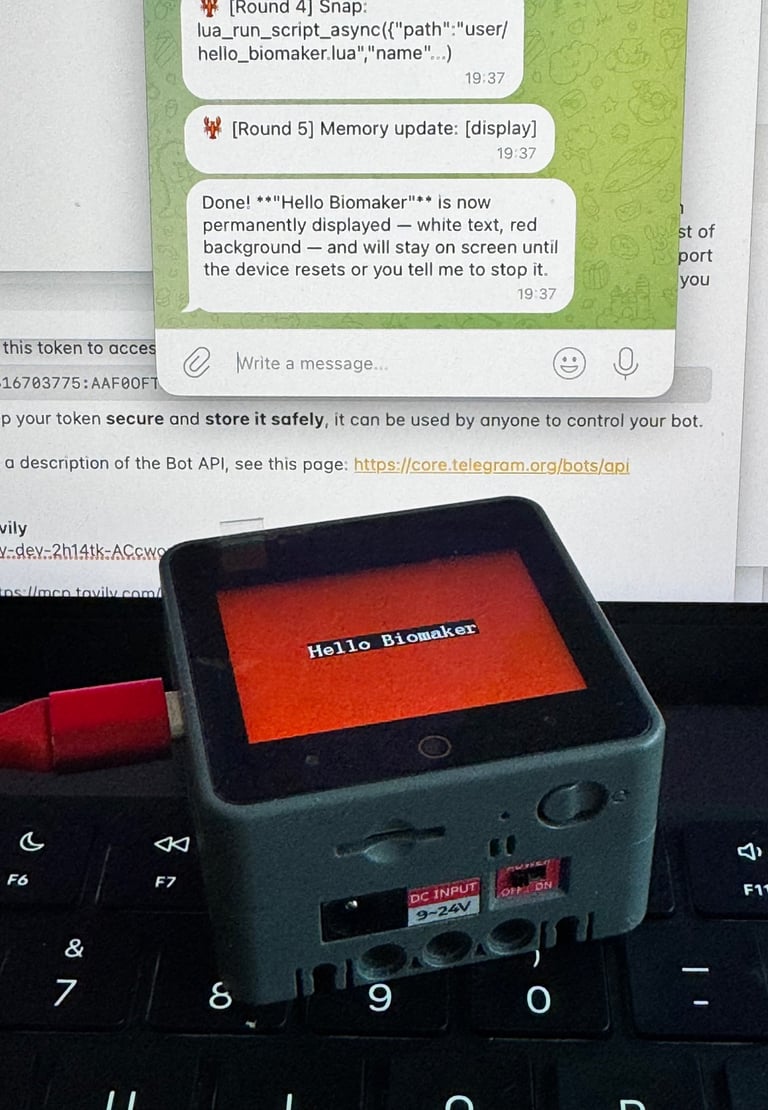
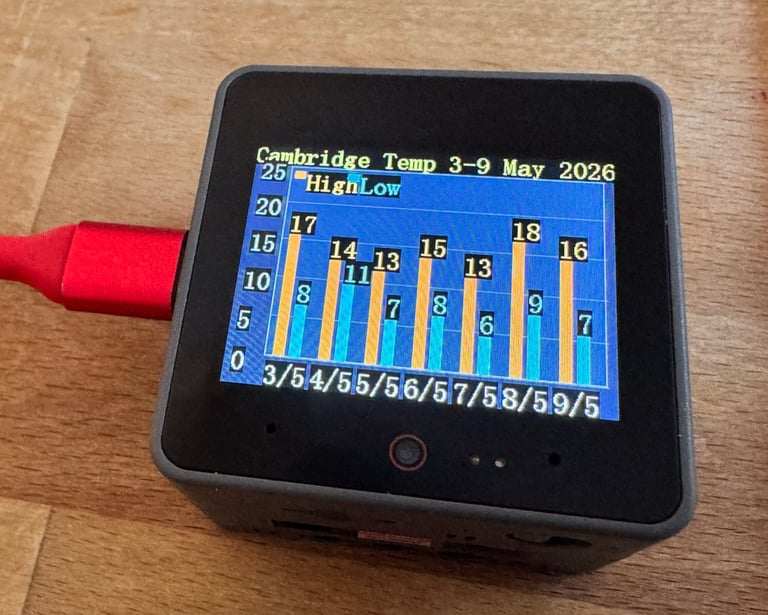
Above: apps programmed via simple prompts via Telegram and ESP-Claw, with results displayed on an M5Stack CoreS3.
Above: Web browser screen for UiFlow2 showing editing tools and dual Blockly and Micropython interfaces.
Below-left: Visual interface for no-code LVGL programming of M5Stack device touchscreens.


biomaker.org